Pro available Chrome Web Store

Chrome extension

WebChange — Track Any Web Element for Changes

Pick. Track. Get notified. Highlight a price, stock badge, headline, or any visible block on a page — WebChange watches that region and alerts you when the text or state changes.

Overview

Monitor what you see — not the whole website

WebChange is a visual change detector for the open web. You choose the exact DOM region that matters; we compare future snapshots and notify you when something shifts.

Whether you are waiting for a price drop, a “In stock” label, a competitor’s banner, or a policy paragraph to update, manual refresh is a waste of time. WebChange lets you mark an element once and receive structured alerts when that slice of the page changes.

  • Point-and-click selection — like cropping a screenshot, but for live data
  • Ideal for product prices, inventory strings, rates, headlines, and status labels
  • Free tier: up to 5 monitors, desktop notifications, fully local workflow
  • Pro tier: 24/7 cloud monitoring even when Chrome is closed
  • Pro alerts via WebPush, Telegram, and Discord webhooks
  • Monitor list synced to the cloud on Pro — pick up on any device

How monitoring works

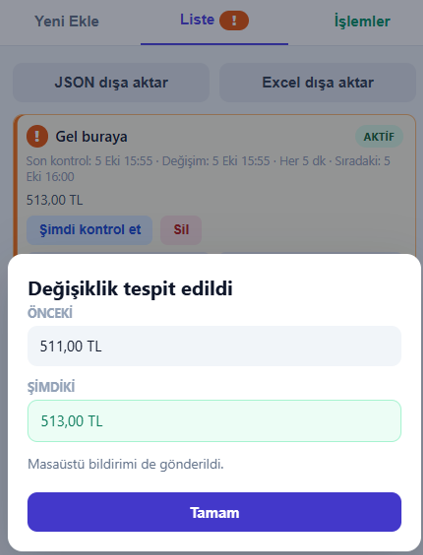
Each monitor stores a selector and baseline snapshot of the content inside your marked region. On every check cycle, WebChange reads the current text/HTML fragment and diffs it against the last known value. When a meaningful change is detected, you get a notification with the page title, monitor name, and before/after context where available.

Free — local-first monitoring

The free plan is designed for privacy-conscious users and quick personal watches. Checks run while you use Chrome — no AddonsStore account required, no cloud upload of your monitor list. You get up to five active monitors and native desktop notifications when a change occurs on an open or background tab (within browser limits).

Pro — always-on cloud watches

Upgrade when you need reliability: our cloud workers revisit your URLs on a schedule, even if your laptop is asleep. Unlimited monitors, WebPush to your desktop, Telegram bot messages, and Discord webhook posts keep teams and power users in sync. Your monitor configuration is stored securely in the cloud so reinstalling the extension does not lose your setup.

Perfect for

  • Deal hunters tracking SKU prices across retailers
  • Resellers watching supplier stock indicators
  • Developers sanity-checking production status pages
  • Researchers waiting for published stats or PDF links to appear
  • Community moderators spotting headline or rule changes
  • Small teams piping alerts into Discord or Telegram channels
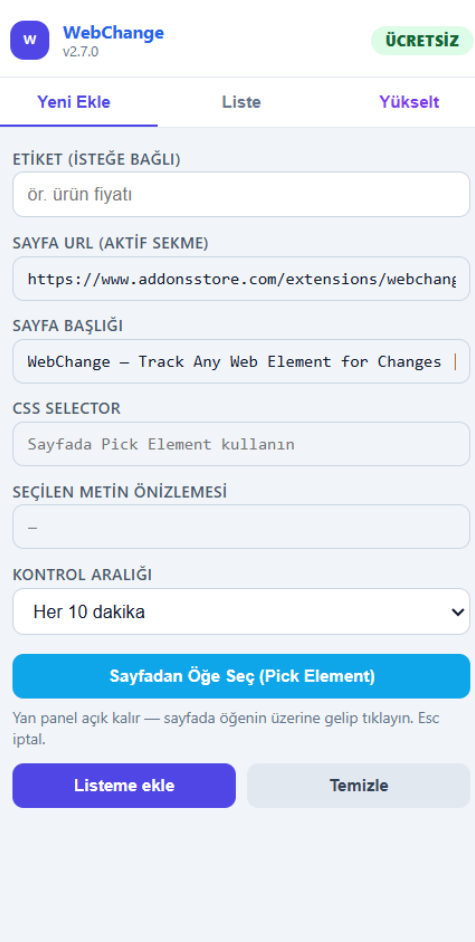
WebChange — selecting an element to monitor on a webpage
Plans

Free & Pro — same extension, different reach

Start free with local monitors. Move to Pro when you need always-on cloud checks and multi-channel alerts.

WebChange — Track Any Web Element for Changes

Pick. Track. Get Notified.

FREE

$0/month

  • Up to 5 monitors
  • Desktop notifications
  • 100% local — no servers, no accounts
Get started

PRO

$9/month

  • 24/7 cloud monitoring (browser closed)
  • Unlimited monitors
  • WebPush desktop notifications
  • Telegram notifications
  • Discord webhook
Upgrade to Pro

Compare all extension plans on the pricing page

Features

Alerts that match how you work

Visual targeting, sensible defaults on Free, and production-grade delivery on Pro.

Visual element picker

Draw around the price, badge, or paragraph you care about. WebChange binds to that node — not the entire page body.

24/7 cloud checks (Pro)

Scheduled fetches from AddonsStore infrastructure keep watching while your browser is closed or your PC is offline.

WebPush & desktop

Free includes Chrome desktop notifications; Pro adds reliable WebPush delivery for critical price and stock events.

Telegram bot alerts

Pipe changes to your phone or team chat — perfect when you live in Telegram more than email.

Discord webhooks

Post structured embeds to a channel when a monitor fires — great for deal groups and ops rooms.

Unlimited monitors (Pro)

Track entire watchlists — SKUs, listings, forums — without hitting the five-monitor Free cap.

Multi-channel WebChange notifications
Team channels — Telegram & Discord
Notifications

One change, many destinations

Pro users connect their preferred channels once, then assign per-monitor routing rules. Send high-priority stock alerts to WebPush and Telegram, while routing noisy pages only to Discord for archival.

  • WebPush — instant desktop pop-ups with monitor name and URL
  • Telegram — mobile-friendly messages with change snippets
  • Discord — webhook payloads your moderators can pin or thread

Free users still benefit from Chrome desktop notifications while browsing — no account, no webhook setup.

Cloud-backed monitor list
Pro cloud sync
Cloud sync

Your watchlist, backed up

On Pro, monitors live in AddonsStore cloud storage — URLs, selectors, labels, and notification preferences. Sign in on a new machine, reinstall after an update, or share templates across teammates without rebuilding from scratch.

Free keeps everything on-device: ideal when you want zero cloud footprint and only a handful of personal watches.

Set up a monitor in minutes

Same flow for Free and Pro — Pro adds cloud scheduling and extra channels after upgrade.

1. Pick element

Open the product or dashboard page, launch WebChange, and highlight the region that shows price or stock.

2. Name & save

Give the monitor a label, choose check frequency (Pro), and save to your local or cloud list.

3. Background checks

Free checks while Chrome runs; Pro cloud workers keep polling 24/7 even when you are away.

4. Get notified

Desktop, WebPush, Telegram, or Discord — whichever channels you enabled for that monitor.

FAQ

Frequently asked questions

Plans, privacy, cloud monitoring, and notification channels — answered for WebChange.

Up to 5 monitors, desktop notifications inside Chrome, and a 100% local setup — no AddonsStore account and no cloud storage of your watchlist. Checks run in the browser while Chrome is active.

Pro runs scheduled checks from AddonsStore servers so URLs are revisited 24/7, even when your browser is closed. You also get unlimited monitors and cloud backup of your configuration.

Pro includes WebPush desktop notifications, Telegram bot messages, and Discord webhook posts. You can mix channels per monitor depending on urgency.

Yes — that is the primary use case. Select the DOM node that renders currency, discount labels, “Add to cart”, “Out of stock”, or quantity strings. Any visible text change in that region can trigger an alert.

The Free tier keeps monitors on your device. Pro requires cloud storage of monitor definitions (URL, selector, settings) so our workers can check pages on your behalf — see the privacy policy and store listing for details.

WebChange Pro is $9/month with unlimited monitors and all notification channels. Upgrade from the extension or visit the pricing page.

Create a webhook in your Discord server settings, paste the URL into WebChange Pro, and choose which monitors post there. Each alert includes the monitor name, page link, and a summary of what changed.

Public URLs work best for cloud checks. Pages behind strict login or CAPTCHA may need you to keep a logged-in session locally (Free) or use Pro features where supported — test with your target site before relying on alerts.

Pro available — from $9/month

Start tracking with WebChange

Install free for up to five local monitors, or upgrade for 24/7 cloud watches and Telegram, Discord, and WebPush alerts.

Add to Chrome View plans Support